 New topic
 Printable
| Author | Message |
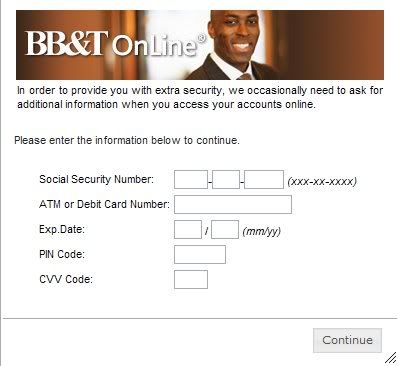
This pop up thing keeps trying to get all my personal info. [img:$uid]http://i68.photobucket.com/albums/i9/jgascot/fraud2.jpg[/img:$uid]
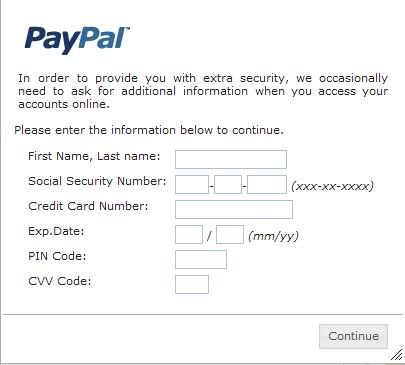
[img:$uid]http://i68.photobucket.com/albums/i9/jgascot/fraud1.jpg[/img:$uid]
I have run scans on Norton Antivirus, Malwarebytes and Spybot Search and Destroy...they all say nothing is there
I got locked out of my personal online account last night and was asked this info, but within the site, the pop up did not look like this one. My bank told me that sometimes when resetting passwords they can ask for this info, so I'm hoping that because that one was dealing with resetting acct info it was legit
Has anyone had this happen to them? Any tips on getting rid of it?? It has to be some sort of spyware that has attached itself to my computer. After running all those 3 programs I don't know what to do next. | |
- E-mail - orgNote -  Report post to moderator Report post to moderator |

 but whenever I log on to my accts (or even, I just discovered, if I put in a fake name and random log in) it pops up (notice same wording on both, though different sites) and won't let me close it or move forward on the site.
 , otherwise I'm either screwed (or the identity thief is cuz my current credit is laughable
 ). Either way I had them cancel out my atm card and they're sending me a new one.
johnart said:
I have run scans on Norton Antivirus, Malwarebytes and Spybot Search and Destroy...they all say nothing is there
I got locked out of my personal online account last night and was asked this info, but within the site, the pop up did not look like this one. My bank told me that sometimes when resetting passwords they can ask for this info, so I'm hoping that because that one was dealing with resetting acct info it was legit
Has anyone had this happen to them? Any tips on getting rid of it?? It has to be some sort of spyware that has attached itself to my computer. After running all those 3 programs I don't know what to do next. Norton is fairly crap and often overlooks many problems (I also have that on good authority from professional computer repair people). It's clearly not genuine and the best way to be sure, if you can't detect it, is back up everything you want to keep and restore you computer at startup ...it's also nice because it runs faster without the crap you never knew you had. Iobit also do a free toolbox which contains all manner of spyware, privacy, optimisation software...not saying it'll do the trick but it's worth a try. Can't remember the exact name but google CCCleaner and go to the iobit website (cccleaner is part of the toolbox..it's the only way I can remember the website) Good luck [Edited 11/4/10 12:20pm] | |
| - E-mail - orgNote - Report post to moderator |
| Moderator
|

Ohh purple joy oh purple bliss oh purple rapture! REAL MUSIC by REAL MUSICIANS - Prince "I kind of wish there was a reason for Prince to make the site crash more" ~~ Ben |
| - E-mail - orgNote - Report post to moderator |

 moderator
Yeah, John. I just had a program fuck up my work computer for a whole day. It was from one of those companies selling security programs. It claimed my computer was infected with 24 differnet worms and viruses and kept shutting down my comuter every 15 minutes. I couldn't do shit. Finally the IP guys at work must have done something because now it's working fine and I didn't do diddly but call them and tell them about it. I think you probably need to get a really good antivirus program. We use Microsoft Forefront. | |
| - E-mail - orgNote - Report post to moderator |
Don't tell the program "No"...just close it and shut off your computer.
Update your virus protector.
I hate viruses! People who use them should rot.
I'm firmly planted in denial | |
| - E-mail - orgNote - Report post to moderator |

Nothinbutjoy said: Don't tell the program "No"...just close it and shut off your computer.
Update your virus protector.
I hate viruses! People who use them should rot.
I always do that - I never click anything but always go to Task Manager and end it from there | |
| - E-mail - orgNote - Report post to moderator |