 New topic
 Printable
| Author | Message |
Putting VHS footage on DVD is frustrating!  I don't know which DVD recorder to use I don't know which DVD recorder to use
my uncle has this one: 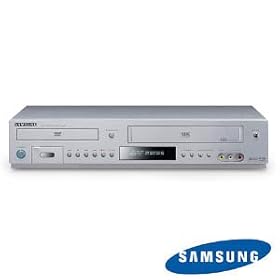
but I'm not sure it'll work  "We may deify or demonize them but not ignore them. And we call them genius, because they are the people who change the world." | |
- E-mail - orgNote -  Report post to moderator Report post to moderator |

Why not? What are your doubts about it? | |
| - E-mail - orgNote - Report post to moderator |
I don't have one of the "all-in-one" recorders, but I do have a separate DVD and VCR. It is a pain to do it either way. I have also used
 for pc. It does a pretty good job...especially if you want to edit. for pc. It does a pretty good job...especially if you want to edit.**--••--**--••**--••--**--••**--••--**--••**--••-
U 'gon make me shake my doo loose! http://www.twitter.com/nivlekbrad | |
| - E-mail - orgNote - Report post to moderator |

bboy87 said: is frustrating!
I don't know which DVD recorder to use
my uncle has this one:
but I'm not sure it'll work That'll work fine. Why would you think it wouldn't? We don’t mourn artists because we knew them. We mourn them because they helped us know ourselves. | |
| - E-mail - orgNote - Report post to moderator |

I have a VHS to DVD player/recorder. It works...though I never used it as much as I thought I would. All I can say is some players are better than others. Some are basically taking crappy DVD and Crappy VHS and putting them in one box. I suggest in researching the product before you get it. Christian Zombie Vampires | |
| - E-mail - orgNote - Report post to moderator |

Genesia said: bboy87 said: is frustrating!
I don't know which DVD recorder to use
my uncle has this one:
but I'm not sure it'll work That'll work fine. Why would you think it wouldn't? I tried it but I didn't know how to exactly configure the wires because as soon as I pushed "copy", it went to the dvd screen and wouldn't record. I think I have to link both ports together "We may deify or demonize them but not ignore them. And we call them genius, because they are the people who change the world." | |
| - E-mail - orgNote - Report post to moderator |
bboy87 said: Genesia said: That'll work fine. Why would you think it wouldn't? I tried it but I didn't know how to exactly configure the wires because as soon as I pushed "copy", it went to the dvd screen and wouldn't record. I think I have to link both ports together You should not have to link anything that's the beauty of the device. Is there copy protection on your VHS? Is it a bought VHS tape of a movie? If so you may have to rig it so it can copy by putting a piece of stiff tape over the square indentation. Let me back up a bit...On "blank" VHS tapes that you used to buy at the store have a tab on the side that when pushed in or broken off means you can't tape over it. When you bought a movie on VHS, this tab would NOT be there as they would not want you to accidentally tape over a movie you just bought. Subsequently, this tab pushed in means that it's "protected" and many machines recognize this and won't allow you to copy the tape to another. I also have a VHS tape that has HEAVY encryption beyond the tape indentation. So it could be that. Christian Zombie Vampires | |
| - E-mail - orgNote - Report post to moderator |
superspaceboy said: bboy87 said: I tried it but I didn't know how to exactly configure the wires because as soon as I pushed "copy", it went to the dvd screen and wouldn't record. I think I have to link both ports together You should not have to link anything that's the beauty of the device. Is there copy protection on your VHS? Is it a bought VHS tape of a movie? If so you may have to rig it so it can copy by putting a piece of stiff tape over the square indentation. Let me back up a bit...On "blank" VHS tapes that you used to buy at the store have a tab on the side that when pushed in or broken off means you can't tape over it. When you bought a movie on VHS, this tab would NOT be there as they would not want you to accidentally tape over a movie you just bought. Subsequently, this tab pushed in means that it's "protected" and many machines recognize this and won't allow you to copy the tape to another. I also have a VHS tape that has HEAVY encryption beyond the tape indentation. So it could be that. It's a tape that has recorded material. It's a blank tape, well not anymore 
I put the tape in, then put the DVD in, pressed play on the tape, and then pressed copy, and the driver said the player doesn't recognize the disc "We may deify or demonize them but not ignore them. And we call them genius, because they are the people who change the world." | |
| - E-mail - orgNote - Report post to moderator |
My father just finished transferring all his boxing archives from VHS to DVD. He had some 100+ tapes to transfer, that shit took FOREVER. | |
| - E-mail - orgNote - Report post to moderator |

Are you sure this device records from VHS to DVD? It looks like mine which is just a "combo" player which plays DVDs and VHS tapes. And I can only copy from DVD to VHS. Just asking... | |
| - E-mail - orgNote - Report post to moderator |

dannyd5050 said: Are you sure this device records from VHS to DVD? It looks like mine which is just a "combo" player which plays DVDs and VHS tapes. And I can only copy from DVD to VHS. Just asking...
And what model is it? Normally there is ONE button one can push to do auto copy. You may want to check the manual...there may be limitations on the type of DVD it will take. Christian Zombie Vampires | |
| - E-mail - orgNote - Report post to moderator |
Some are recorders, some are just two separate players...you can tell in the price difference. players are about 120, recorders are about 200.
We bought one, forget the brand, but it was CRAPPY for VHS recording onto DVD...we just used it for recording off the TV onto DVD and recording our 8mm videos onto DVD. (nice feature) Thanks for the laughs, arguments and overall enjoyment for the last umpteen years. It's time for me to retire from Prince.org and engage in the real world...lol. Above all, I appreciated the talent Prince. You were one of a kind. | |
| - E-mail - orgNote - Report post to moderator |
